Multi-model AI chat with a prompt library, prompt generator and Turbo Mode for comparing or merging responses.
AI ChatbotsFreemium
Marketing AI with shared brand context, collaborative Canvas editing, custom agents, and Grid for repeatable content production.
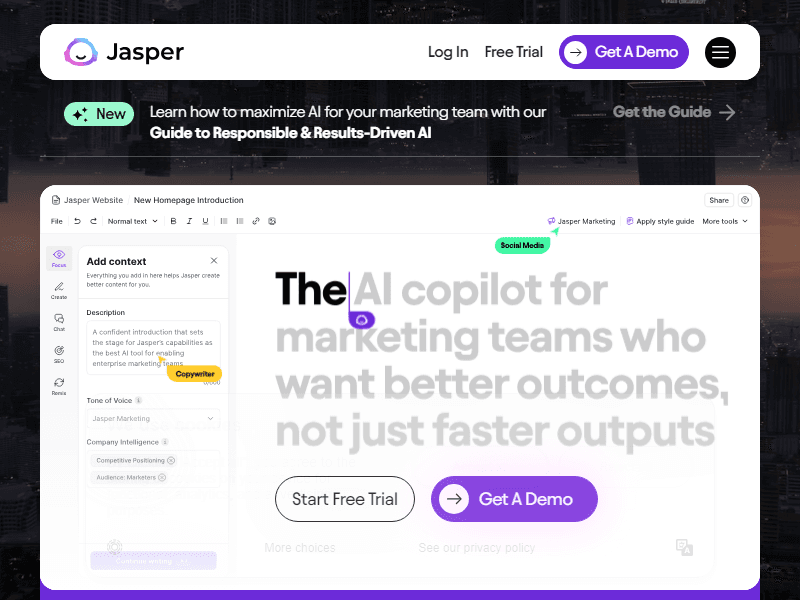
Jasper is a marketing AI platform for teams that need to turn an approved message into many useful assets. A product marketer can develop a launch narrative, a content team can prepare an article, and a lifecycle team can adapt that material for email or regional audiences. Jasper brings these activities together through Canvas, marketing agents, Jasper IQ, Studio, and Grid. Its central idea is that a team should reuse its brand instructions and company knowledge instead of rebuilding the same context in every prompt.
That makes Jasper especially relevant when several people write for the same organization or manage multiple brands. The work still needs a clear brief and an editor who understands the product. Jasper supplies generation, adaptation, and workflow tools; your team supplies the evidence, editorial judgment, and approval required to publish. Its value is easier to assess on a real campaign with related deliverables than on an isolated request for a clever headline.
Jasper's platform organizes content creation around marketing tasks. Its agents cover activities such as drafting, research, translation, and optimization, while the surrounding workspace lets people refine the results. Rather than treating every task as an empty chat box, a team can select a relevant agent and give it the inputs required for a defined deliverable.
A useful brief might include a product's actual capabilities, the problem it addresses, the audience's level of familiarity, the desired next step, and claims that must be avoided. Those details help distinguish an introduction for first-time buyers from a technical comparison for an evaluation committee. Jasper can generate versions for different channels, but the team should decide which information belongs in each one. An advertisement has a different job from a detailed implementation guide.
Suitable users include product marketing, content marketing, brand teams, agencies, and marketing operations groups. A solo writer can use the editing environment, while a larger department may care more about shared context and repeatable workflows. A team that only occasionally rewrites a paragraph may need less configuration than Jasper's broader platform offers. Teams with recurring product updates, regional campaigns, or large content inventories have more opportunities to reuse its structured inputs.
Jasper IQ holds the context that helps steer generations. Its components have different purposes: Brand Voice influences how writing sounds, audiences describe whom it should address, company knowledge supplies factual material, and a style guide captures editorial rules. Keeping these separate is useful. A warm tone should not change a warranty condition, and an audience preference should not become an unsupported product claim.
The current Brand Voice guide describes creating a voice from writing examples, files, or URLs. You can review the resulting description and preview it on different types of content. Choose examples that represent the writing you want to repeat. A collection of unrelated guest posts or old campaign slogans may teach a less coherent style than a small set of approved product pages and customer communications.
Audiences add reusable reader context. Jasper supports a primary audience with secondary audiences, which can help when an asset must address several people involved in a purchase. For example, an operations manager may care about workflow changes while a finance stakeholder needs a clear explanation of commercial terms. Set the primary audience deliberately so the draft has a recognizable point of view.
The Knowledge Base provides approved company information and supports connected sources such as Google Drive and SharePoint. Treat source maintenance as part of content production. Assign an owner to update launch dates, discontinued features, positioning, and regional qualifications. A polished draft can still be wrong if the source material contains an obsolete offer or contradicts a more recent policy.
Canvas is Jasper's collaborative environment for drafting, editing, and working with agents. It gives a team a place to develop related assets while keeping their context connected. A campaign owner can work on an overall direction, review outputs, and refine specific pieces as the campaign takes shape. This is useful when the first draft is a starting point for discussion rather than a finished deliverable.
For a webinar campaign, start with an approved abstract and speaker information. Develop the landing-page explanation first, then adapt it into an invitation email and social posts. Check that each version accurately describes the same event. A shorter social post should simplify the message without inventing a new promise, and an email subject line should match the content someone sees after clicking.
Editing a selected passage is often more practical than regenerating an entire asset. If the introduction is too abstract, ask for a concrete opening while retaining the approved structure. If the call to action assumes too much reader knowledge, explain the next step in plain language. This gives a reviewer control over the change being made and makes it easier to compare the revision with the original brief.
Shared creation also benefits from a clear review sequence. Decide who checks facts, who reviews positioning, and who approves the final channel version. Keep unresolved claims visible until their owner answers them. The presence of a collaborative workspace does not settle those decisions automatically; it provides a place where the team can carry them out.
Jasper's Style Guide supports rules for editorial consistency, including wording and punctuation conventions. This can help a department apply product naming, capitalization, terminology, and other preferences across writers. It serves a different purpose from Brand Voice: a voice describes a broad style, while a rule can state how a particular expression should be handled.
Write rules that an editor could apply unambiguously. For example, specify the approved spelling of a product family and when its abbreviation may be used. Keep regional rules explicit if different markets require different conventions. If two rules conflict, resolve the conflict in the source guidance rather than expecting generation to infer which team has authority.
Research, translation, and optimization agents extend the drafting workflow. Use research output to identify questions and supporting material, then open the relevant sources before retaining a factual claim. For translation, provide a glossary and have someone familiar with the target language review important messaging. Product names, legal qualifications, and industry terminology can require different treatment from ordinary prose.
Jasper also offers tools connected to SEO and AI-answer visibility. These can support content planning and optimization work, but search placement and citations depend on systems outside the editor. Evaluate the recommendations for relevance to the reader: a page should answer its intended question with clear information, rather than accumulating sections only because an optimization tool suggests them.
Jasper Studio lets teams create custom agents without building a separate application. You describe the requirements, configure inputs, review instructions and example output, and test the agent before publishing it to appropriate workspace users. Studio also supports versions, so a new configuration can be evaluated before it replaces the active one.
A product-description agent is a practical example. Give it separate inputs for product name, verified specifications, intended buyer, regional restrictions, and the approved call to action. Define an output structure that distinguishes the summary from detailed features. An example output can demonstrate the expected format, but it should not contain fabricated testimonials or results that the agent might imitate.
Test more than the cleanest sample. Try a product with missing information, two similar variants, and a specification that requires a qualification. Ask whether the draft leaves gaps visible or fills them with plausible language. When a configuration produces useful results, document its intended use and the review that remains necessary. A reusable agent should make a process easier to repeat, including its boundaries.
Publishing permissions matter when a team has many contributors. Separate the ability to run an approved agent from the authority to alter shared instructions. If a new rule changes every product description, review a representative set of outputs before activating the version. That approach helps a team understand the effect of a configuration change rather than discovering it after a large batch is complete.
Jasper Grid is a spreadsheet-like surface for structured, repeatable content work. Rows can hold inputs such as product details or campaign requirements, and configured generation produces related outputs. It is intended for marketing operations where the same process needs to run across many items with shared brand context.
For a catalog update, separate stable identifiers from descriptive inputs. Include the SKU, approved source information, audience, market, and required output fields. Generate a small representative set first, then examine whether similar products remain distinguishable. A batch of fluent descriptions is less useful if every item receives the same broad benefits or the wrong compatibility statement.
Jasper provides API and MCP access for connecting its context and generation capabilities with other systems. The agent API documentation describes agent inputs and options for applying knowledge, voice, audience, and style configuration. These routes require attention to authentication, workspace defaults, available agents, and usage charges.
Agree on the destination and approval point before connecting output to a CMS or another production system. A generated field may be appropriate for a review queue while a price, contract qualification, or publication status should remain controlled elsewhere. Confirm that the specific export or integration you need is available in your account; a platform's broader integration story does not establish every endpoint or publishing behavior.
Suppose a software team is introducing a reporting feature. Begin with a short source pack: the feature specification, availability conditions, approved screenshots, and answers to likely customer questions. Remove internal speculation from the material used for public copy. Create or choose the relevant brand voice and audience, then develop the central explanation in Canvas.
Have the product owner review the description before generating derivative assets. Once the explanation is accurate, produce an announcement email, a sales enablement summary, and channel-specific social drafts. Give each asset a distinct purpose. The enablement summary can address objections and account context, while the announcement email can focus on what the recipient can do next.
If the launch repeats across markets or product variants, encode the stable structure in Studio and consider Grid for the structured inputs. Retain fields for local availability and reviewer notes. Compare several outputs against their source rows, including an item with incomplete data. Finish by moving approved assets into the team's publishing process and tracking which source version supported them.
This sequence also provides a sensible evaluation of Jasper. Measure whether the team spends less effort repeating context and whether drafts meet its editorial requirements. Record the corrections that recur: missing qualifications may call for better knowledge, inconsistent terminology may call for a style rule, and weak positioning may require a clearer brief. These are different problems with different remedies.
The current pricing page presents a paid Pro plan with a free trial and a custom-priced Business plan. Pro has defined context allowances, while Business adds broader customization, custom-agent building, Grid, API access, and organizational controls. Confirm the exact features and limits in the checkout or agreement for your workspace.
Business access can also involve consumption charges. Jasper's credits documentation describes a shared workspace credit bank for actions such as API/MCP use, Grid output generation, and certain advanced agents. Standard creation and premium actions are handled differently. Budget around the actual workflow you intend to run, including batch volume and any advanced research or optimization steps.
For larger teams, review governance controls alongside the content features. Ask who can manage shared voices, knowledge, rules, and custom agents, and which administrative capabilities apply to the purchased plan. A department should also establish what material may be uploaded and how changes to shared brand context are approved.
Will Jasper automatically know our product? It needs relevant context. Supply current specifications and approved messaging, then check generated claims against them. Brand Voice influences expression; it does not replace factual knowledge.
Can we use it for a whole campaign? Canvas, agents, and shared IQ context support related marketing assets. Your team still determines the campaign strategy, channel requirements, approval order, and final distribution.
When should we use Studio or Grid? Studio is useful for a repeatable task with clear inputs and an expected output. Grid is useful when that task needs to run across structured rows. Start with a few reviewed examples before committing a large inventory.
Does it guarantee factual accuracy or search results? Generated content requires review, and external discovery systems control their own rankings and citations. Keep evidence for important claims and prioritize an informative page over a checklist of suggested phrases.
Is the trial a permanent free plan? Jasper's main subscription offering is paid, with a time-limited Pro trial and Business sales access. Review billing, cancellation, credits, and plan-specific entitlements before choosing a workspace.